Trending New Games
Sprunki Phase 39
Credits for this mod
Game title: Sprunki Phase 39
Original Sprunki concept: NyankoBfLol
Phase 39 creator: Unknown fan
Official status: Community-made phase
Sprunki Phase 39 uses a limited colour palette across the stage and interface.
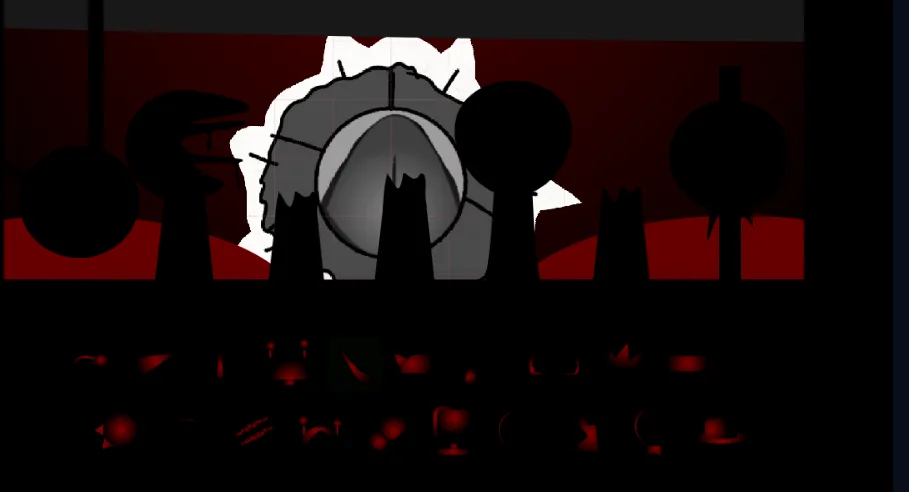
Black fills most of the screen. Dark red appears behind the character positions, while grey and white are used for the large central form. Smaller red details are visible across the character-selection area.
The supplied images show the main stage along with separate views identified as Mr. Sun and Oren. This article describes only what is visible in those images. It does not add character history, causes, status information, or story details that are not provided.
Game Screenshots
The Main Stage Uses Large Black Silhouettes
Several inactive or unselected characters appear as black silhouettes across the upper part of the stage.
Their outlines vary:
some have round heads;
one has a wider side profile;
one has pointed ears or a narrow crown-like top;
another has a small vertical shape above the head;
and several have narrow lower bodies.
The silhouettes stand against a dark red background. Because most of their bodies are completely black, their identities cannot be confirmed from the image alone.
A large grey-and-white form occupies the centre and covers more space than the surrounding silhouettes.
The Central Form Has Several Circular Layers
The centre of the stage contains a large circular grey shape.
Its visible parts include:
a dark grey outer section;
a lighter grey inner circle;
a thin vertical line through the centre;
an irregular white border;
and several black lines crossing the grey surface.
The circular form appears in more than one arrangement across the supplied images.
In one view, the central section is closer to the foreground. In another, an additional circular layer is visible behind it.
The images do not confirm whether these are separate forms or different moments in one animation.
Mr. Sun’s Visible Design
One supplied image identifies the central circular form as Mr. Sun.
His design in this phase is mostly grey, white, and black. The bright yellow face commonly associated with Mr. Sun is not visible.
The centre contains a narrow vertical line. A lighter grey ring surrounds it, followed by darker grey sections and an uneven white outline.
The white outer area has several pointed and irregular edges.
Black lines divide parts of the surface. These lines are visible across both the grey and white sections.
Mr. Sun Appears in More Than One Position
The two Mr. Sun-related views show changes in the arrangement of the circular parts.
In one image:
the central grey form is large;
the lower section is partly covered by black foreground shapes;
and the white border extends around the upper and side areas.
In another image:
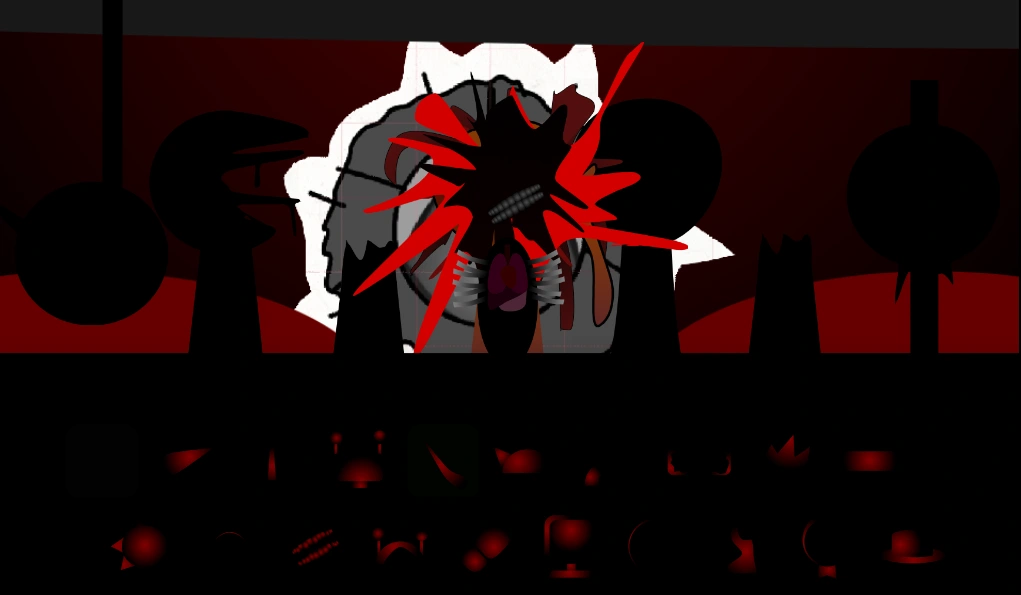
a second grey circular layer is visible behind the front one;
the front circle appears smaller;
and more of the white border can be seen around both layers.
The images suggest movement or a layered animation, but the exact animation sequence cannot be established from still images alone.
The White Border Remains Visible Behind the Grey Sections
The irregular white section is one of the clearest details in Mr. Sun’s design.
It extends beyond the grey circular parts and creates several pointed edges.
The white area also separates the central character from the dark red background.
Without this white border, several grey and black parts would blend into the silhouettes around them.
The Character Row Covers the Lower Part of the Centre
Black character shapes stand in front of Mr. Sun.
Their lower bodies cover part of the central circle in every supplied view.
This makes the exact bottom edge of Mr. Sun difficult to see.
The images do not show whether he occupies a normal character slot or is positioned behind the other performers.
It is only clear that his visible form is much larger than the black silhouettes around him.
Oren’s Phase 39 Appearance
Another supplied image identifies the foreground character as Oren.
His appearance includes:
a dark central head area;
multiple bright red pointed shapes extending outward;
grey and white sections behind him;
a purple-red shape in the lower centre;
pale grey repeated details on both sides of that lower shape;
and additional brown and red sections near the body.
The red pointed shapes spread across a large part of the centre and cover sections of Mr. Sun behind him.
Oren’s Head Is Difficult to Separate From the Background
Oren’s upper central area is black.
Because the background and nearby silhouettes are also black, the exact outline of his face is not fully visible.
The bright red extensions provide most of the visible shape around his head.
Some of these red forms are long and narrow. Others are shorter and wider.
The image does not confirm what these shapes represent, so they should be described only as pointed or extended red elements.
The Lower Centre Contains Purple and Grey Details
Below Oren’s dark head is a purple-red central shape.
Repeated pale grey details appear on both sides. A dark horizontal section is also visible above them.
The image does not clearly establish whether this area is part of the face, chest, or another body section.
It is therefore safer to describe it as the lower central part of the design.
Brown vertical sections can also be seen beside the grey details.
Oren Covers Much of Mr. Sun
When Oren is visible, his red and black form occupies the same central area as Mr. Sun.
The white border and grey rings remain partly visible behind him, especially around the upper-left and side areas.
This overlap makes the stage considerably harder to read than the views showing Mr. Sun alone.
The supplied image does not confirm whether the overlap is caused by stage placement, scale, or a specific animation.
The Selection Icons Are Extremely Dark
The lower interface contains two rows of character icons.
Most are shown in black with small red highlights.
Only partial details can be made out, including:
red circles;
narrow red lines;
red facial sections;
a crown-like shape;
a small hat;
and several curved outlines.
The icons are not bright enough to identify confidently from the images alone.
Their positions may be more useful than their visual details when learning the character order.
The Colour Palette Is Consistent Across the Interface
The same colours repeat across the stage and selection area:
black;
dark red;
grey;
white;
and small purple or brown details.
Mr. Sun contains most of the visible grey and white.
Oren introduces more bright red across the centre.
The surrounding silhouettes and icons remain predominantly black.
Smaller Details Disappear Against the Background
The stage’s dark presentation hides several narrow elements.
Black limbs, facial outlines, and lower bodies blend into the interface. Red marks can also merge with the red wall behind them.
The central white and grey form remains the easiest section to identify because it has the greatest contrast.
Oren’s bright red pointed elements remain visible, but parts of his black centre are obscured.
Disclaimer
Sprunki Phase 39 is an unofficial fan-made project. Sprunkit is not affiliated with, endorsed by, or officially connected to NyankoBfLol, Incredibox, So Far So Good, or the creator and contributors of this specific mod.
Sprunkit does not claim ownership of the game or its underlying creative assets.
Sprunki Phase 39 FAQs
What is Sprunki Phase 39?
Sprunki Phase 39 is an unofficial fan-made Sprunki project with a dark red-and-black stage and altered character designs.
Is Sprunki Phase 39 an official release?
No. It should be treated as an unofficial fan-created project.